
HOW TO PLAY / FIELD NOTES
STREETWEAVE: a better road, a town that grows
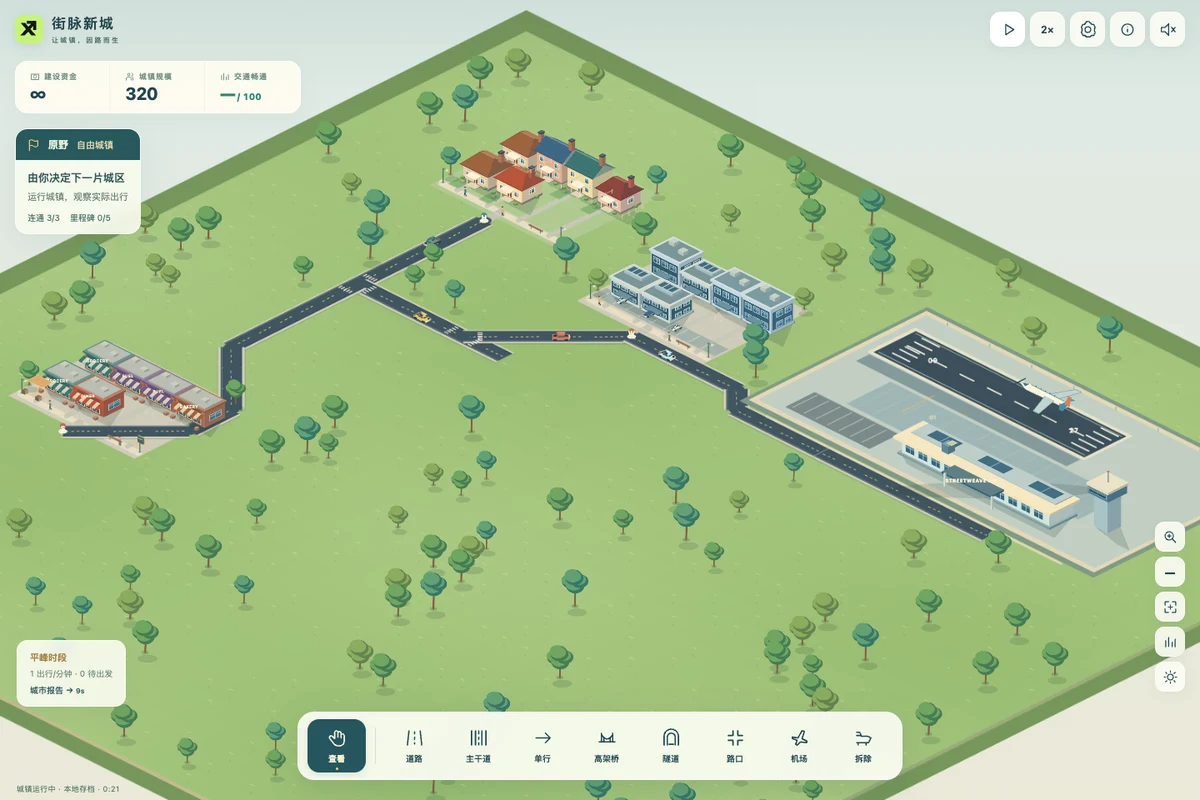
Build a low-rise town around the journeys people actually make. Connect neighbourhoods, ease junctions and give the airport a road network that can handle its arrivals.
- Devices
- Desktop · Tablet · Phone
- Players
- Single player
- Language & sound
- English / 中文 · Starts muted
Is this your kind of game?
For players who enjoy building and watching a city, with their attention on roads rather than many municipal systems.
Controls at a glance
Choose Street and drag to draw. Apply & run saves a plan and resumes the town; the check button saves while staying paused. Mouse wheel zooms; Space + drag pans. On touchscreens, one finger builds and two fingers pan/zoom. The second finger cancels an unfinished stroke.
First connect the coloured entrances
H marks homes, W workplaces and S shops. A neighbourhood connects at its small entrance marker, not by touching any building wall. Click a district and use Road entrance to focus it. Unbuilt future parcels show their reserved boundaries while planning.
Connect every active district in both directions. Select Play after applying a plan, then watch actual journeys complete. Homes and businesses develop automatically when they are served; there is no water, electricity or tax panel to manage.
Pause to plan, run to learn
Selecting a building tool pauses the simulation. Draw several connections, undo or redo, and apply the batch when ready. Your real town and save change only on Apply. Cancel abandons the pending plan.
A wider avenue carries more cars, but it does not fix a blocked exit. Look for a second route or a better junction. One-way arrows follow the direction in which you draw; check that returning journeys still have a route. Signals manage their phases automatically. Roundabouts need room and can also queue.
Cross the landscape deliberately
Water needs a bridge; mountains need a tunnel. Both ends need space on land for the approach. Elevated roads cross ground traffic without joining it, while same-level crossings form actual junctions.
Buildings and future parcels keep their footprints. Drawing over an existing street upgrades it for the extra cost; redrawing the same specification does not charge twice. Removed roads drain existing cars while new journeys seek legal alternatives.
An airport connects the world and adds traffic
Airports become available in challenge 6 and immediately in free build. Use the suggested clearing or choose another legal site, then connect the airport’s front road. Its basic module includes a runway, terminal and a little parking.
Flights land, taxi, unload and take off automatically. Departing residents drive in, arriving passengers generate rental or pickup trips, and parked cars stay until their travellers return. Check access roads before expanding the terminal or runway: more air capacity also brings more cars.
Three airport stages introduce larger planes and more gates. Parking and pickup expansions help different queues. You do not manage airlines, fuel, crews or real flight data, and there is no public-transit system.
Read the peaks, then verify the result
Morning commuting, shopping hours and the homeward rush generate different real journeys. Each challenge moves through connection, district development and a sustained capacity audit. A lifetime trip total alone does not complete it.
Open Town report for recent completed journeys, average trip time, added delay and the latest budget settlement. Locate a blocked origin or busy junction. Selecting a district can show an actual current route; a red dashed connection means no legal path exists.
Choose when the town expands
- Open the objective panel when a new district becomes available. Choose a district, accept its construction grant and connect its entrance. Later challenges require more districts as well as completed journeys.
- Free towns reserve additional districts where land and existing roads allow, with five development milestones. Three independent medals reward completing the objective, maintaining the flow target and staying within construction cost. You can continue improving a completed town.
- Free build offers five seeded landscapes, three town slots and either a normal or unlimited budget. Returning to a slot resumes that town; use Regenerate this slot to replace it with your chosen landscape and seed after confirmation.
Progress & backups
Progress stays in this browser through IndexedDB, including road plans already applied, traffic, airport queues and view position. Refresh resumes paused. Settings exports an encrypted JSON backup; imports preview before replacing local towns. No account, cloud sync or offline growth. Export before changing browsers or clearing data.
Language follows this portal. To change it, choose EN / 中文 here and open the game again. Each visit starts with sound off; enable it in the game if you want audio.
Ready for a run?
You might also explore: SCRAP ALARM · All guides
Found an outdated instruction or a control issue? Send the game name, device and steps to reproduce it to brucexiamh@gmail.com.