
HOW TO PLAY / FIELD NOTES
CAT VS DOG: read the wind and keep a useful aim
A turn-based slingshot duel where the best correction is often smaller than your first instinct.
- Devices
- Desktop · Tablet · Phone
- Players
- Up to 2 on one device
- Language & sound
- English / 中文 · Starts muted
Is this your kind of game?
For a mouse or touch aiming game, against the CPU or a friend sharing the device.
Controls at a glance
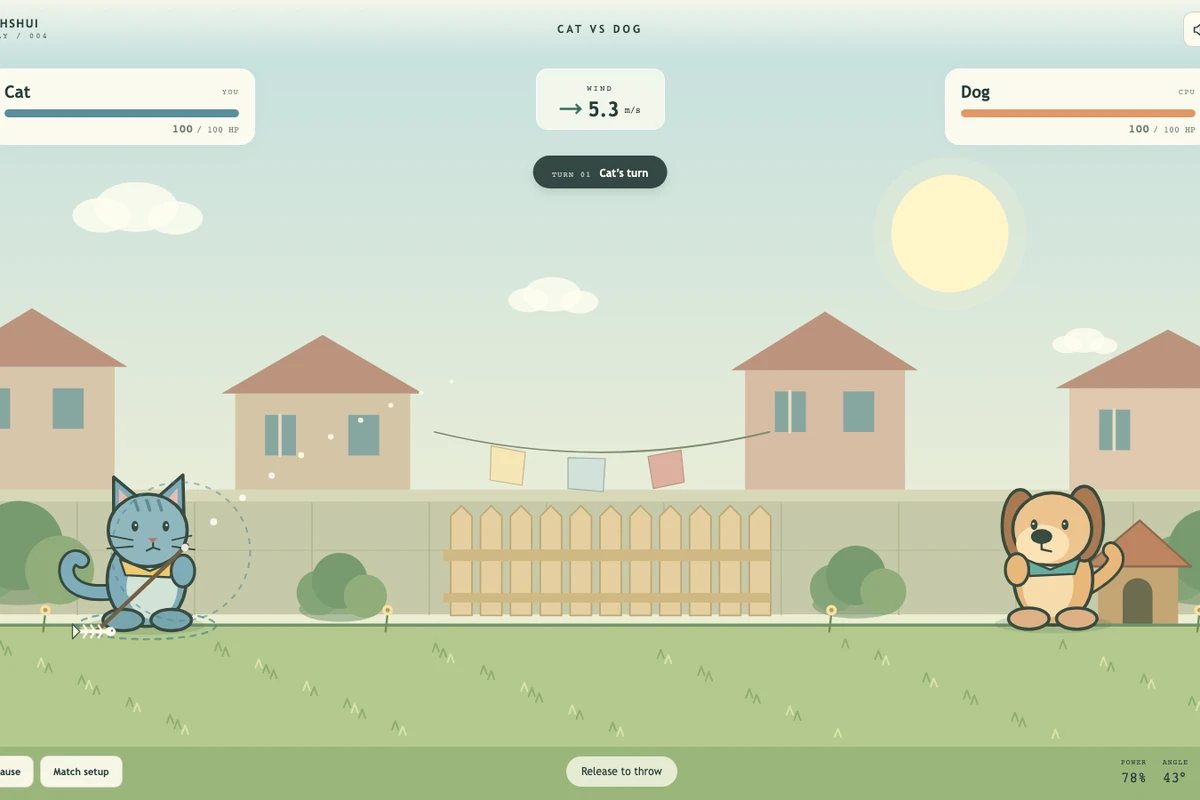
Choose cat or dog, then drag back and release to throw. Desktop uses a mouse; phone and tablet use touch. Phones require landscape. Read the visible wind indicator before each throw.
Build a reference throw
Make a first throw that gives you useful information. Watch whether it lands short, long or at the right distance but with the wrong arc. Change one part of the aim at a time so that the next result tells you something.
The wind is rerolled for each throw. Do not copy a successful drag blindly when the direction or strength has changed. Think of the wind as a correction to your reference shot, then adjust again from the landing.
A round belongs to both sides
Both sides get a throw before a round is settled. Taking one side to zero does not remove the other side’s final reply in that round. If both reach zero, the result is a draw; first turn is not an immediate finish-line advantage.
Closer hits do more damage. Against the CPU, choose a difficulty that lets you learn trajectory correction. In a local match, pass the device without changing the language or controls and let the next player read their own wind indicator.
A better next attempt
- Avoid changing power and angle drastically at the same time after a narrow miss.
- Recheck the wind even after a perfect hit.
- Use the full visible arc and landing as feedback, not just the damage number.
Progress & backups
A duel is a local session with no online room or cloud account. Choose a fresh match when you want to change sides or challenge a different CPU level.
Language follows this portal. To change it, choose EN / 中文 here and open the game again. Each visit starts with sound off; enable it in the game if you want audio.
Ready for a run?
You might also explore: STICK ARENA · All guides
Found an outdated instruction or a control issue? Send the game name, device and steps to reproduce it to brucexiamh@gmail.com.